- Call Panzer IT+91 90046 55099
- Email UsSales@PanzerIT.com
- AvailabilityWorking 24x7 | World Wide Work






Get latest updates on Panzer IT security solutions and product news
Categories
SCOPD is a comprehensive Insider Risk Management platform that combines Data Loss Prevention (DLP), User & Entity Behavior Analytics (UEBA), employee activity monitoring and advanced business analytics into a single, enterprise-ready solution. It helps organizations prevent data leaks, detect insider threats, improve workforce productivity and simplify compliance through intelligent monitoring, automated alerts and actionable insights. Whether you're an SMB, a large enterprise or a cybersecurity partner, SCOPD delivers the visibility, control and confidence needed to protect your business and make informed decisions.
Scopd Data Leak Prevention and Employee Monitoring
Compliance & Workforce Verification
Build a More Secure and Compliant Workplace
Strengthen internal controls with biometric verification, workstation protection and comprehensive audit trails.
Highlights
- Face Recognition
- Zero Trust Re-authentication
- Unauthorized User Detection
- Webcam Tamper Protection
- Automatic Workstation Lock
- Access Control Integration
- Outlook Calendar Integration
- Employee Identity Verification
IT Asset Visibility
Monitor Devices, Software & Infrastructure
Gain complete visibility into enterprise assets while identifying unauthorized software and hardware changes.
Highlights
- Hardware Inventory
- Software Inventory
- License Visibility
- Hardware Change Detection
- Software Change Detection
- CPU & GPU Monitoring
- Remote Device Monitoring
Cheatsheet
| Business Challenge | How SCOPD Helps |
|---|---|
| Prevent Data Leakage | Monitor and control sensitive data movement across endpoints, email, cloud and removable media. |
| Detect Insider Threats | Identify abnormal user behavior before it becomes a security incident. |
| Improve Workforce Productivity | Measure employee performance with objective analytics and detailed reports. |
| Strengthen Compliance | Maintain audit trails, biometric verification and comprehensive activity records. |
| Investigate Security Incidents | Capture complete evidence using Black Box recording, screenshots and activity history. |
| Reduce Operational Risk | Receive real-time alerts and automate policy enforcement across your organization. |
DATA LEAK PREVENTION (DLP)
Stop Sensitive Data Before It Leaves Your Business
Protect intellectual property, customer information and confidential documents from accidental or intentional leakage across endpoints, browsers, email, cloud services and removable media.
- Document-aware Data Loss Prevention
- Browser, Email & Messenger Monitoring
- Clipboard & Print Protection
- USB & Removable Media Control
- FTP & File Sharing Restrictions
- OCR & Keyword-based Detection
- Digital Fingerprinting
- Shadow Copy & Evidence Collection
Employee Productivity Analytics
Transform Employee Activity into Actionable Business Intelligence
Go beyond monitoring. Measure productivity, identify top performers, improve workforce efficiency and make objective business decisions using advanced analytics.
Highlights
- Productivity Scorecards
- Department Comparison
- Employee Performance Analytics
- Time Tracking
- Attendance Analysis
- Active vs Idle Time
- Application Usage
- Website Usage
- HR Analytics
Employee Monitoring
Complete Visibility Across Office & Remote Workforces
Monitor employee activities in real time while maintaining transparency and supporting organizational security policies.
Highlights
- Live Screen Monitoring
- Screenshots & Screen Recording
- Webcam Monitoring
- Program Usage
- Website Monitoring
- Search History
- Messenger Monitoring
- Geolocation
- Process Monitoring
Insider Threat & UEBA
Detect Insider Risks Before They Become Incidents
Traditional security solutions detect malware. SCOPD detects risky employee behavior, insider threats and unusual activities using behavioral analytics and AI-driven risk analysis.
Highlights
- Risk & Efficiency Analyzer
- Behavioral Analytics
- Suspicious Activity Detection
- Atypical User Behaviour Alerts
- Face Recognition
- Employee Replacement Detection
- Keyboard Typing Pattern Analysis
- Automated Risk Reports
Digital Investigation & Incident Response
Capture Complete Evidence for Every Security Incident
Maintain detailed records for investigations, compliance audits and legal evidence.
Highlights
- Black Box Recording
- Audio Recording
- Continuous Screen Recording
- Screenshot Timeline
- Evidence Archive
- User Activity Playback
- Searchable Event History
- Incident Reconstruction
Reporting & Investigation
Powerful Reports for Audit and Incident Investigation
Generate detailed reports for management, HR, compliance teams and security investigations.
Features
- Executive dashboard
- Summary reports
- Department reports
- Employee reports
- Clickable drill-down reports
- Activity feed
- Timeline reports
- Circular productivity charts
- Excel export
- SQL-based custom reports
- Automated report scheduling
- Report distribution via Email
- FTP export
- Dropbox export
Enterprise Deployment
Built for Organizations of Every Size
Designed for startups, SMBs and global enterprises with flexible deployment and low system overhead.
Highlights
- Windows, Linux & macOS Support
- Active Directory Integration
- Multi-Domain Support
- MS SQL & PostgreSQL
- Cloud & On-Premises Deployment
- Remote Workforce Support
- Low Client Resource Usage
- 10,000+ Endpoint Scalability
Reporting & Executive Dashboards
Turn Employee Data into Executive Insights
Generate visual dashboards, detailed reports and business intelligence that help management make faster, data-driven decisions.
Highlights
- 80+ Built-in Reports
- Executive Dashboards
- Activity Timeline
- Department Reports
- Risk Reports
- Productivity Reports
- Scheduled Reports
- Excel Export
- SQL Reporting
Real-Time Response & Policy Enforcement
Respond Instantly to Security Events
Receive alerts, block unauthorized activities and remotely manage employee endpoints from anywhere.
Highlights
- Real-Time Alerts
- Telegram Notifications
- Live User Monitoring
- Website Blocking
- Application Control
- USB Restrictions
- Remote Administration
- Emergency Lockdown
Frequently Asked Questions
Employee Monitoring, Isn't Spying?
Why Employee Monitoring is a Must for Every Organization
In today’s digital workplace, employees have access to vast amounts of company data — and not all risks come from outside.
Employee Monitoring helps organizations:
- Prevent data leaks & insider threats by tracking file transfers, emails, USB activity, and cloud uploads.
- Enhance productivity by analyzing time spent on productive vs. non-productive applications.
- Ensure compliance with RBI, SEBI, IRDAI, and DPDP guidelines on data handling and monitoring.
- Detect abnormal behavior early, enabling proactive action before damage occurs.
- Provide transparency and accountability in remote, hybrid, or on-site work environments.
In short, it’s not about spying — it’s about protecting business data, improving efficiency, and ensuring trust and compliance.
How do I design cyber security framework for my organization?
To define required cyber security in organization, one need to consider compliance & actual necessities. Compliance can be GDPR, DPDP, RBI, SEBI, IRDA, AICTE/UGC etc. Both requires data protection from internal and external threats + assets protection. More or less all cyber security framework suggests following steps:
1. Prepare: Define and implement comprehensive Cyber Security Framework. Define roles and responsibilities.
2. Identify: Understand compliance, requirements, problem areas and its solutions.
3. Protect: Implement solutions to protect digital assets.
4. Detect: In case of breach, identify impact, detect problem area.
5. Respond: On detection, how organization will respond to prevent any breach – define roles and solutions.
6. Recover: In case of breach, how organization will restore operations & prevent misuse of breach.
7. Report: Methods and tools to report to authority
Line of Defence:
1. CISO / Cyber Security Manager
2. Centrally Managed, Centralised Data Repository
3. Data Backup and Disaster Recovery
4. Firewall and VPN
5. VAPT
6. Data Leak Prevention, Encryption
7. Identity Management, Access Management, ZTNA
8. Anti Malware (with EDR/XDR/MDR)
9. Asset Management, Patch Management, MDM
10. Anti Phishing Simulation & Cyber Security Training
Is Employee Monitoring legal?
Questions
- Is it ok for employer to capture personal information and data of employee?
- Can Employer peek in to my data?
- Can employer spy on my PC?
- Can employer restrict my PC usage?
- Can employer decide what sites I visit and what application I use?
- My employer capturing all my data and activity of my PC. Is it lawfully correct?
- My company implemented a data leak prevention solution. Anything I should be worried of?
- My company implemented a solution, which is capable of recording every activity of my PC, including my personal social media accounts, banking passwords and more. What legal action can I take?
- Pros and Cons of Employee Monitoring
Employee Monitoring and User Behavior Analysis Uses
Organizations can use employee monitoring for various reasons. Some of them are:
- Find non-productive personnel & Improve overall productivity
- Identify and prevent personal use of employer’s facilities
- Protect crucial data & information
- Find required business information when the employee is not available
- Prevent or investigate possible unlawful or immoral activities by employee
- Keep check for violations of company policy against digital assets ie data use policy
- Keep check on visited websites, used applications, email contents etc
- This may also help to prevent data breach & malware attacks
Implications of implementation of Data Leak Prevention Solutions and User Behavior Monitoring
Employers generally are allowed to monitor employees’ activity on device provided by employer. Since the employer owns the premise, resources, computer network, hardware, software and even employees’ time, organization is free to use them to monitor employees.
Most computer monitoring tools allow employers to monitor without the employees’ knowledge. However, some employers do notify employees that monitoring is the norm. The information can be communicated to employees in appointment letter, email, general notice, or any official communication medium.
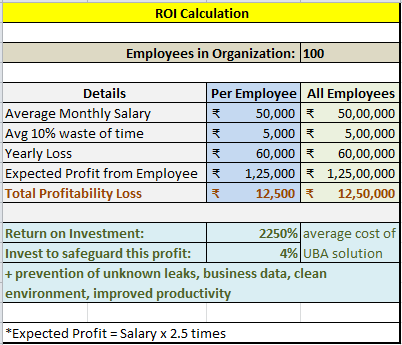
Financial benefits
Employee Monitoring can be used to monitor the safety and productivity of the employees but it also may help businesses financially. From the dishonest unethical employee who snips time and money from the business – to redefining of unprofitable processes in monitoring employee actions. Employee monitoring allows the growth of financial profits against a small investment. The monitoring of employees can also help in the protection of employees and it can help as protection in litigation by employees for job-related issues such as failing to perform, illegal activities and harassment claims.
The employer of today has the capability and legal right to read e-mail, access files, examine computer usage and track computer usage activities. Every communication on a network between devices can be tracked. Every action by an individual worker on a computer can be tracked, analyzed and used to organizations’ benefit.
The protections and freedoms guaranteed by the U.S. Constitution and Bill of Rights are there to protect the individual from the Government but this does not generally apply to general employee-employer relationship. To benefit the business, employers can monitor employees whenever they feel is necessary.

Legal Issues
In January 2016, European Court of Human Rights issued a landmark ruling in the case of Bărbulescu v Romania (61496/08) regarding monitoring of employees’ computers. The employee Mr. Bărbulescu accused the employer of violating his rights to ‘private life’ and ‘correspondence’ set in the Article 8 of the European Convention on Human Rights. But the Court stated that the employer had every right to monitor the employee’s computer in this case due to the fact that such monitoring was implemented to ensure that there is no breach of company policy. This historic ruling has confirmed that it is not unreasonable for employers to monitor their employees’ computer activity and such monitoring does not violate their human rights.
A year later, in July 2017, German court also ruled that computer monitoring of employees is reasonable but the use of keylogging software is excessive.
A nine-judge bench of the Supreme Court headed by Chief Justice JS Khehar, ruled on August 24, 2017 that the Right to Privacy is a fundamental right for Indian citizens under the Constitution of India (mostly under Article 21 and additionally under Part III rights).
Organizations’ digital assets and data created on it or during office hours using organization resources, cannot be considered private property of person. Employers have a well-established legal right to track Web surfing, emailing and other activities by employees using company computers and mobile devices. But should they do it?
Employer should consider the difference between monitoring and surveillance. Employer can ensure proper use to protect the company’s assets and reputation. Employers should understand their risks, security needs, employees’ emotions and develop a balanced policy.
Employer should set rules for use of email, chat, social networks, blogging, web surfing, downloading & using software. Better to get signed code of conduct for digital assets from all employees. This can be part of appointment letter or whenever it’s introduced for existing employees.
Employee Perspective & Personal Data
Organization need to define policy for using official time / resources / device for personal work. Consider other situations like BYOD, personal work on office device at home etc.
The employer shouldn’t look at private emails because the employee has a reasonable expectation of privacy. However, employees should be careful about using person accounts on company’s owned device, as all information on device can be accessed by IT team by way of data leak prevention, data backup, traffic monitoring or other monitoring software. Monitoring in any case will be done at router or firewall level. Also tracking possible on Domain Controller, central storage. IT Admin can take remote access of user’s PC.
Employer can also block such personal use of device. In employers’ interest they can analyze what all websites employee accessed and what all data or applications employee used.
| Employer Version | Employee Version |
| • I am paying you, my infra, my time, I have right to see what you are doing, are you investing resources in productive work or not? • Need to control crucial data and vital information • It’s not one person we are monitoring, its company policy • To improve overall productivity, we need to implement employee monitoring solution • To improve work process, its necessary to implement User Behavior Analysis Solution |
• I am doing all tasks what has been given to me. You cannot spy on me. I access my social media, bank, personal email, which is sometime very important. All these are part of lifeline – day to day activity. You cannot have access to personal data, passwords etc. • What if intercepted data is leaked and unauthorized person misuse to access bank account? Or post something on facebook? • I am working for many years, I am being honest, I am at senior position • I don’t possess any secret data, why I am being monitored? • I have confidential data, why it has to be shared with IT team? |
| Bottom-line: |
| It’s probably wisest just to save anything too sensitive for your personal device or home computer. More likely that organization is worried about certain data, certain employees or incidents. And monitoring is more of routine task to avoid any bad situation. Best is to do personal work on personal device outside office hours. Else be ready to be monitored. |
Explaining the Benefits
It more or less clear that law for information access is with employer. Employer is the boss, they need not inform or explain to employees. Still a small presentation can convince and explain employees, how they will be benefited. E.g.
- Employees will have extra motivation to focus: knowing you get appreciation for each minute of fruitful working.
- More recognition for employees.
- No need to fill up boring daily and weekly reports
- No need to explain much in case task is not completed on time as managers should be updated where time was spent
- Managers will more efficient team members. Who wants an insane coworker who would take your credit or your part of appraisal?
- Manager takes credit of work? Not anymore. It will be visible clearly in reports, who did what?
Other Benefits
- In domain environment, IT Admin can access any device, any data. Finance Data with IT Admin? Using DLP it can be controlled.
- Device Monitoring would give more insight into what team members are doing. This can help catching mistakes before they are out of control.
- You notice a team member working on low-priority project, and you assigned him more important task.
- The intercepted and derived analysis can also be used to understand, who is more productive, and who is less sincere. This will help organizations to appreciate people in right way by giving bonus, promotion, wages; which might be going to no-so-deserving employees at the moment. At the cost of non-sincere staff why sincere staff and organization suffer?
- Employee monitoring can help you to connect every dots. Using such data, organization can get a high-level and granular view of what’s happening in overall organization or at specific time and specific device
- For example, if you know your marketing guy is taking longer than expected on an assignment, you can counsel her/him, or higher freelancer.
- Software Licensing and usage. Autocad being expensive software, monitoring can allow IT team to check how much software is being used on each licensed system? Instead of buying new license for required employee, IT may transfer the license. IT may also analyze whether to opt for concurrent license or normal licensing
- How about paying to software developer on hourly basis where PC monitoring software will clearly show working time of specific app on daily basis?
Best Policies for Employee Monitoring Based on organization requirement, culture and policy
- Define departments, reporting head, hierarchy
- Define Roles, access permissions for departmental heads
- Define how much access on UBA data, IT team and IT Admin should have
- Identify crucial keywords, crucial apps, file types
- Classify the data. Define criticality levels
- Identify leakage channels
- Emails
- Messenger
- Cloud storage, Web Communication, Browser, FTP(s), HTTP(s)
- Removable storage, USB device, external drives, Mobile device, CD
- Printer, Scanner
- File sharing apps
- Network shares, Remote Access
- Define ethical data access policy and set responsibility on heads e.g.
- banking passwords not to be captured and stored
- personal communications not to be stored
- private objectionable communication & captured data not to be circulated
- … more
- Define captured data storage duration, ideally 1-year
- Define rules for access devices, applications, websites, data type
- Define rules for what data can be shared, copied, sent on email by whom
- Data sharing policies on cloud (dropbox, gdrive, icloud, onedrive etc)
- Understand the flow of data in your network
- What data belongs to which department
- Create awareness, check, audit, challenge your own compliance